Transaction History
Path: /transactions
Image: 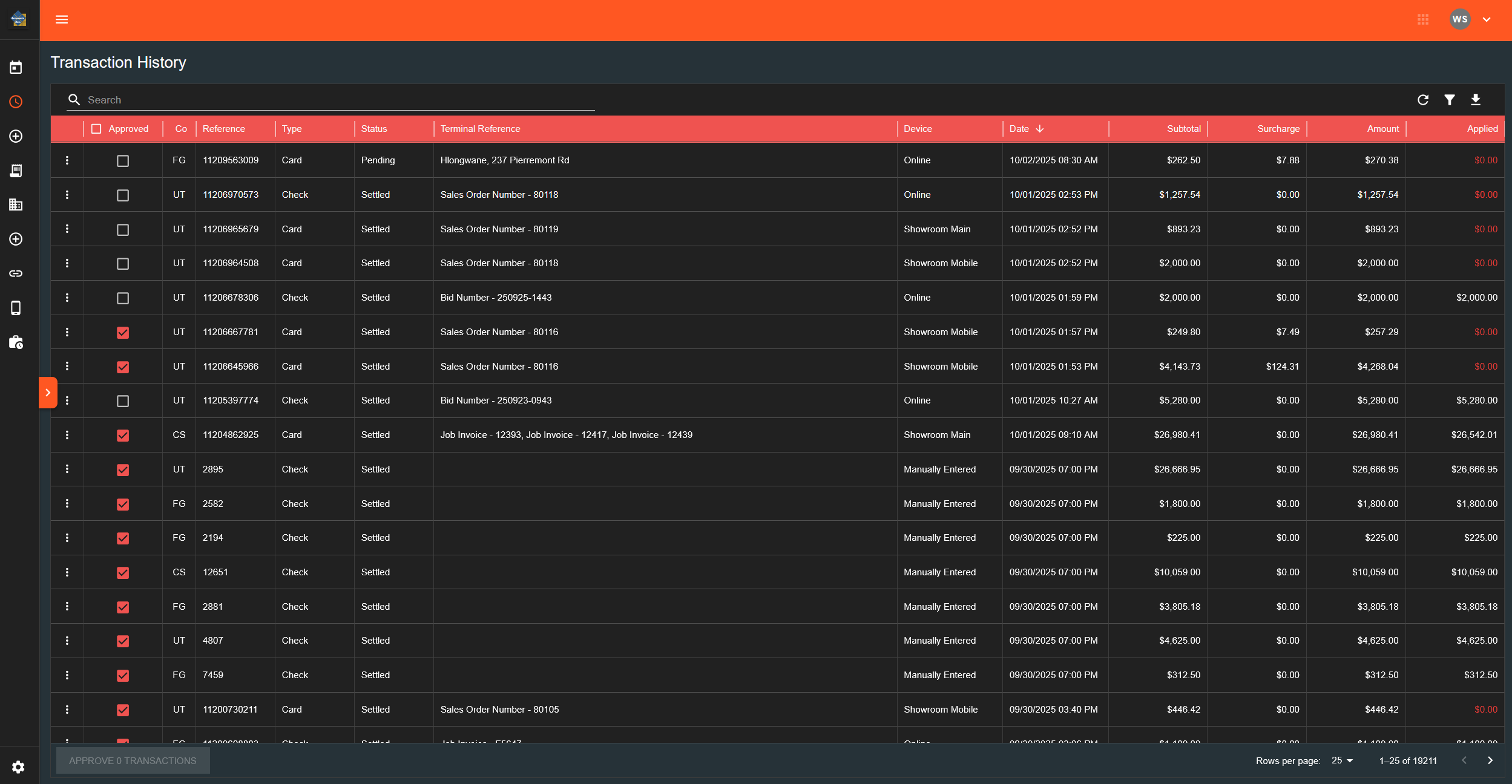
Page Layout
Search and Filter Bar
Search Field:
- Text input at top
Filter Drawer (accessed via button):
- Approved Only (checkbox with three states)
- Manual Only (checkbox with three states)
- Applied Only (checkbox with three states)
- Companies section (checkboxes for each)
- Statuses section (checkboxes for each status type)
- Date Range section:
- Use Date Range checkbox
- Start and end date/time pickers
Action Buttons:
- Apply Filters
- Clear Filters
- Export (downloads CSV)
Transaction Table
Columns:
- Approved (checkbox)
- Co (company code)
- Reference
- Type
- Status
- Terminal Reference
- Device
- Date (with time)
- Subtotal
- Surcharge
- Amount
- Applied (colored red if $0.00)
Row Menu (three dots):
- Edit Applications
- Unapprove Payment (only if approved)
- Delete Payment (only if manual)
Table Footer:
- "Approve [number] Transactions" button (left side)
- Page controls (right side)
Checkbox States
Three-state checkboxes (in filter drawer):
- Unchecked: filter off
- Checked: filter for "true" values
- Intermediate: filter for "false" values
What Happens When You...
Select transaction checkboxes:
- Count updates in footer button
- Button shows: "Approve [number] Transactions"
- Button remains disabled if count is 0
Click "Approve [number] Transactions":
- All selected transactions marked as approved
- Checkboxes clear
- Page refreshes
- Count resets to 0
Click approved checkbox:
- Opens unapproval confirmation dialog
- Dialog asks: "Are you sure you want to unapprove this payment?"
- Clicking "Unapprove" removes approval status
Click row menu → Edit Applications:
- Opens dialog with applications table
- Can add/remove/modify applications
- Save button updates transaction
Click row menu → Delete:
- Opens confirmation dialog
- Clicking confirm removes transaction
- Page refreshes
Apply Date Range Filter:
- Check "Use Date Range"
- Select start and end dates/times
- Click "Apply Filters"
- Table shows only transactions in range
Hover over Applied column (when not $0.00):
- Tooltip appears showing breakdown
- Lists each application: source and amount