Buyouts
Image: 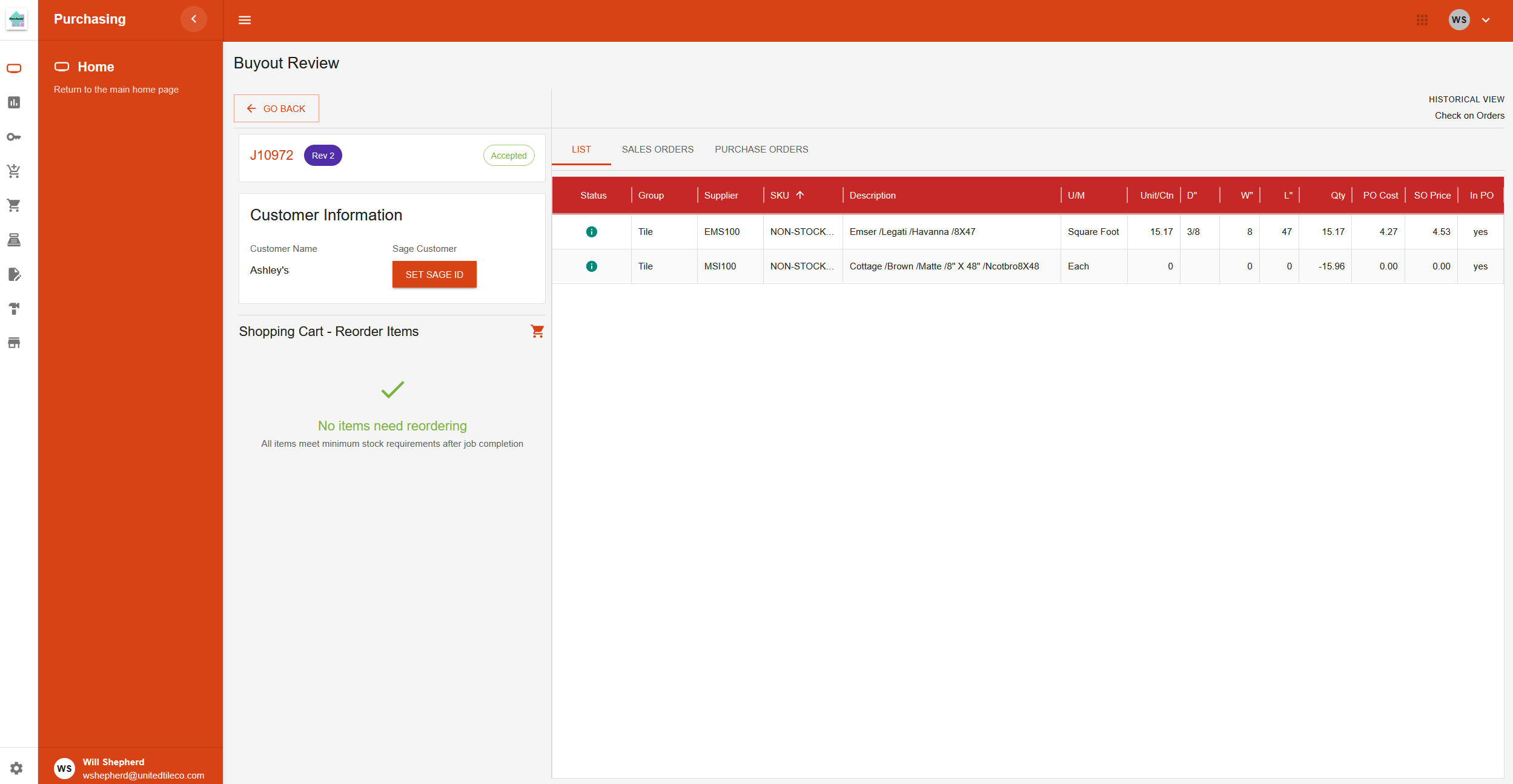
This section is for managing buyout orders. It includes pages for viewing lists of new and old orders, as well as a detail page for reviewing and processing the items on each order.
Pages in this Section
Incoming Buyouts
This page acts as a "to-do list," showing all new buyout orders that are ready for the purchasing department to review.
Buyouts History
This page is an archive, showing all buyout orders that have already been reviewed and processed.
Buyout Detail Page
This is the main workspace for handling a buyout. You get to this page by double-clicking on an order from either the Incoming or History list.
Page Layout
- Header: Displays general information about the buyout, such as the Job ID, customer, and creator.
- Action Buttons: At the top right, you will find buttons to Accept or Reject the entire buyout after reviewing its items.
- Materials Table: The main part of the page is a table listing all the material items included in the buyout. Columns show details like the item description, quantity, and cost.
- Shopping Cart: On the left side, there is a "shopping cart" area. Items from the main table are aggregated here if replenishment is necessary.
Page Actions
- Reviewing Items: You can look through each item in the materials table to check its details.
- Editing Items: You can edit information for each item, such as assigning a supplier.
- Accepting or Rejecting: Once all items have been reviewed and handled, you use the main action buttons to mark the entire buyout as accepted or rejected.