Inventory
Path: /inventory
Image: 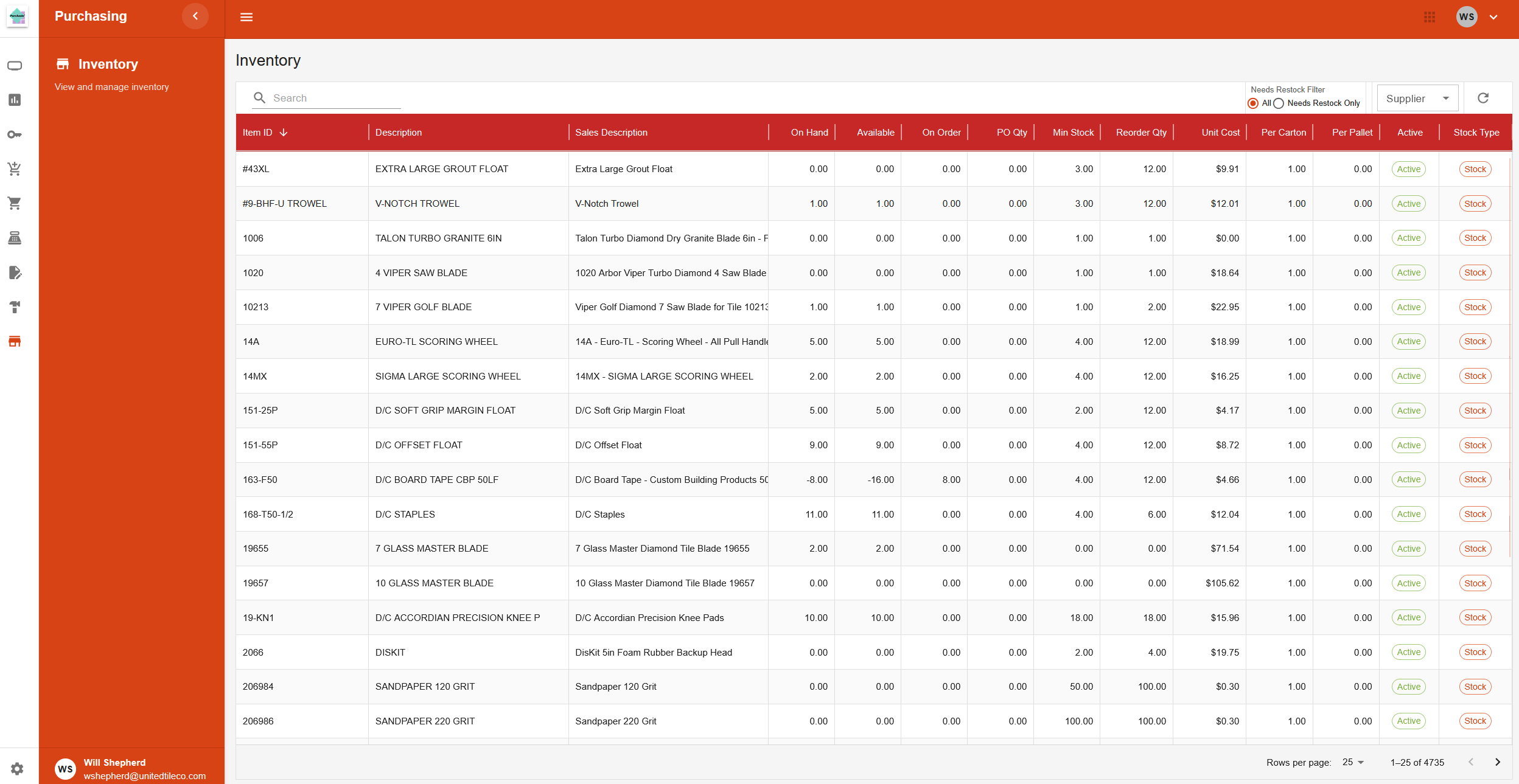
Page Layout
This page provides a searchable and filterable table of all stock inventory items.
Filters and Search
At the top of the table, there are several tools to narrow down the list of items.
- Search Bar: A text box to search for items by keywords.
- Needs Restock Filter: A set of radio buttons to show either "All" items or only items that need to be restocked ("Needs Restock Only").
- Supplier Filter: A dropdown menu to show items from a specific supplier or from "All Suppliers".
Inventory Table
The main section of the page is a table that lists inventory items with the following columns:
- Item ID: The unique identifier for the item.
- Description: The main description of the item.
- Sales Description: The description used for sales.
- On Hand: The quantity currently in stock.
- Available: The quantity available for use (may be different from "On Hand").
- On Order: The quantity that has been ordered but not yet received.
- PO Qty: The quantity on open purchase orders.
- Min Stock: The minimum quantity that should be kept in stock.
- Reorder Qty: The recommended quantity to order when restocking.
- Unit Cost: The last known cost per unit.
- Per Carton: The quantity of items in one carton.
- Per Pallet: The quantity of items on one pallet.
- Active: Shows whether the item is "Active" or "Inactive".
- Stock Type: Shows whether the item is a "Stock" or "Non-Stock" item.