Software Feedback
If you are unsure how to report a bug or ask for a feature, please follow this guide or send an email.
If you wish to recommend a feature or report a bug, please use the link on the bottom of the main screen (if applicable):

If you are not in an app with a button to go to youtrack, then you have to either log into your YouTrack account to create a ticket or send an email of the issue/feature if you do not have one.
After you click this link, you will be on the YouTrack page to report a bug or feature:
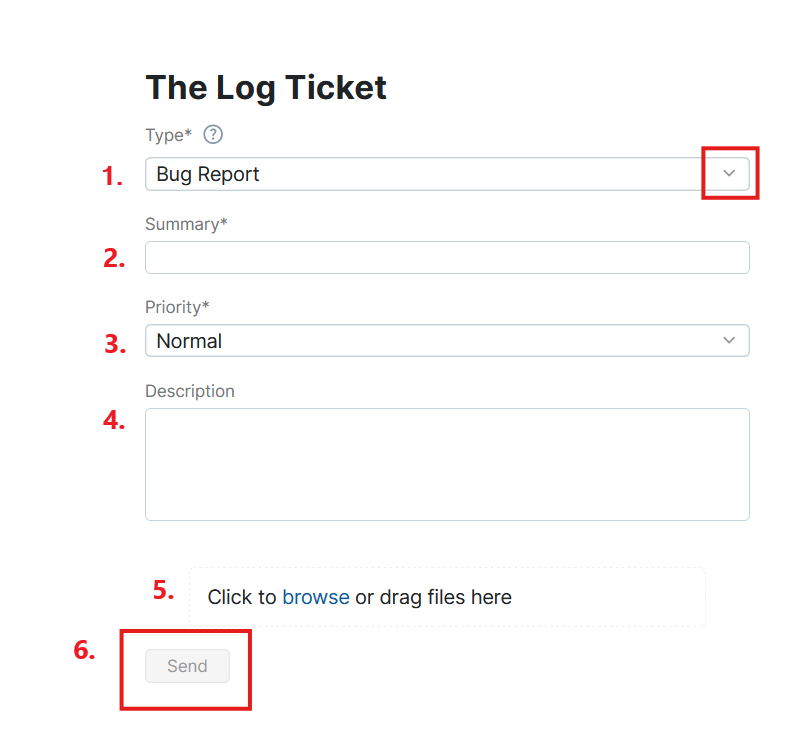
To report a bug or recommend a feature, follow these steps:
- Click the dropdown and select if it is a feature or bug.
- Write a brief summary such as "crash when opening solution card" or "add buttons to the view manager."
- Click the dropdown to select the priority of the feature or bug.
- Write a more detailed description. Please view the tips below for more information on what to write.
- Bug: Please describe how to make this bug occur such as "When I do x, y, and z, The Log will crash."
- Feature: Please describe what you want and where. For example, "I can edit x and y, but I need a button to edit z on the job card."
- (optional) Attach any files that could help such as a drawing for how a new feature should look or a screenshot of a visual bug.
- Click "Send" to submit the bug report or feature request.